Turn hours of gameplay into ranked Shorts — in minutes, on your own PC.

You already know clipping eats your whole night. VERTES watches the entire session, finds the best moments, cuts, captions and ranks them — automatically, on your machine. The hours of editing disappear; you just post. No minute caps, nothing uploaded to the cloud. Free for 7 days, no card — then £10/mo for the first 300.

7-day free trial Hours saved every week 100% local & private Unlimited clips — no caps Built for gaming

60+ games recognised, and it sees your gunfire on every shooter — CoD & Warzone, Valorant, CS2, Fortnite, Apex, Battlefield, Delta Force, Overwatch, Marvel Rivals, Escape from Tarkov, Gray Zone, Hunt, Blood Strike… For games with a kill feed it can even read the on-screen “eliminated”. Works on any game — and on podcasts too.

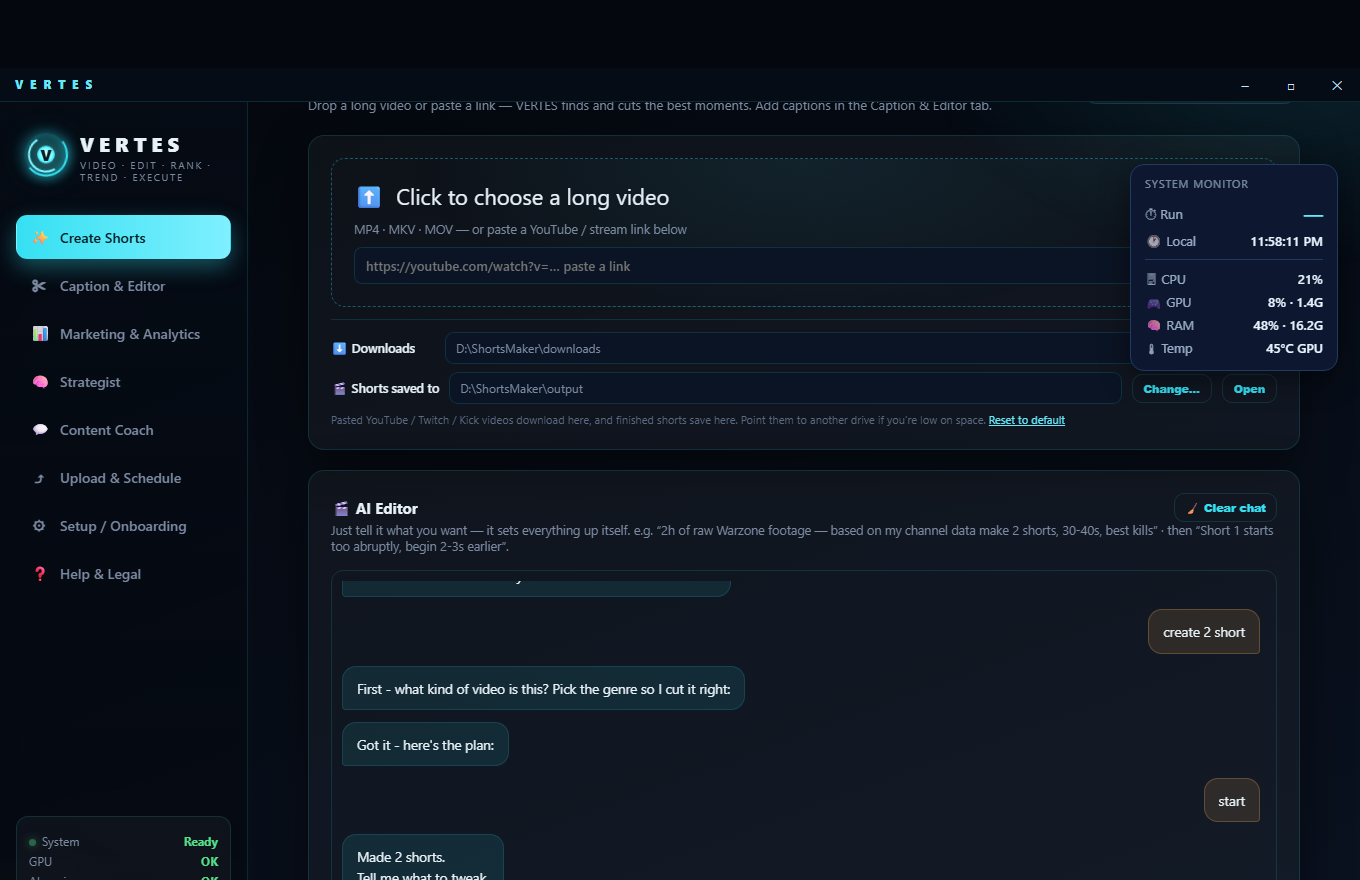
VERTES — talk to the AI editor, it cuts your Shorts

Two months, one channel, one person

The founder's own channel, from the first week of July to today. Straight from YouTube — open it and count.

161,294viewson the channel, counted by YouTube itself
654subscribers598 when VERTES started — +56 since
450+Shorts publishedfrom one person, alongside a day job

Four of them. Cut, cropped, captioned and titled by VERTES — nothing touched by hand afterwards. They play here; the channel is public.

“Your channel has simply exploded!” — the founder's own YouTube Studio analytics summary of the channel, July 2026

Tell it what you want, in one sentence

No settings maze, no timeline, no learning curve — the experience of briefing a human editor, at the speed of software.

2h of raw Warzone footage — make 2 Shorts, 30-40s, the best kills, facecam in a circle at the top.
Got it — here's the plan:
✓ 2 shorts · ✓ 30-40s · ✓ focus: best kills · ✓ facecam: circle at top
Press Start when ready.
Short 1 starts too abruptly — begin 3 seconds earlier for context.
Re-cut plan: Short 1 → starts 3.0s earlier. The new take replaces the old one. ✓ Done.
VERTES Create Shorts with the AI Editor chat

The live product — talk to it in any language, it works in English.

Plain words in, finished Shorts out

One sentence replaces a wall of buttons — and an Advanced panel is there when you want manual control.

Confirms before it cuts

“I understood: ✓ funny moments · ✓ 45s · ✓ 3 versions — Start?” You always see the plan first.

Refine by talking

Every Short is numbered. Ask for more lead-in, a tighter ending, a different vibe — it re-cuts just that clip.

The rest, if you want it

£10 a month for the first 300

Every paid plan is the complete studio — unlimited Shorts, no minute caps, nothing metered. The free 7-day trial is the cutting half: it cuts and captions, no card needed. Founding members lock £10/mo for their first year (10 paid months + 2 free); after the 300 seats are gone the price is £20/mo. Risk-free either way: a 7-day money-back guarantee.

Start here
Free · 7 days
no card needed
A limited studio for a week: it finds your moments, cuts them, reframes to 9:16 and burns the captions. SEO, scheduling, uploading, the Strategist and the Coach arrive with a subscription. Exports carry a small VERTES mark. Nothing to cancel — it simply ends.
Start the trial
Founder · limited
First 300
£10/mo
+ 2 months free
Locked for your first year — 10 paid months, 12 months of access. Then the £20 standard. Only 300 seats exist, ever.
Everyone after
£20/mo
standard price
The regular price once the 300 founder seats are gone. Same app, same unlimited exports — just not the founder rate.
Claim a founder seat
Risk-free: every plan is the complete studio from day one, and a 7-day money-back guarantee means a full refund if it's not for you. Cancel anytime; you keep access until the period ends.
Requirements: Windows 10/11 · a gaming GPU — NVIDIA, AMD or Intel (e.g. GTX 1060 6GB / RX 580 or better) · ~20 GB free space · internet for setup.

Questions

Is there a free trial?

Every subscription is risk-free: try VERTES and get a full refund within 7 days if it's not for you. You get the complete studio from day one — unlimited Shorts, no minute caps, every feature. The built-in local AI runs at no extra cost; only an optional Claude key is billed by Anthropic directly to you.

How much is it, and can I cancel?

Start with the free 7-day trial — no card required. It cuts and captions your Shorts; the rest of the studio comes with the subscription. After that, the first 300 founders pay £10/mo, locked for a year; everyone after pays £20/mo. Cancel anytime; you keep access until the period ends. 7-day money-back guarantee on top.

What happens after my founding year?

Your rate moves to the standard £20/mo, with plenty of notice. You keep everything and every future update — you were simply rewarded for joining early.

Why does it need a GPU? Does it work on AMD / Intel?

VERTES does everything on YOUR machine — transcription, moment detection, rendering — so a gaming GPU does the work that cloud tools meter and cap. It runs on NVIDIA, AMD and Intel GPUs (NVIDIA is currently the fastest; AMD & Intel get hardware-accelerated encoding, with more GPU acceleration rolling out). If you record gameplay, your PC already qualifies.

Is my footage uploaded anywhere?

No. Videos are processed 100% locally. The only things that leave your PC are the Shorts you approve for upload (to YOUR YouTube account), a licence check to keep your subscription active, and — only if you opt into the Claude brain — text snippets sent to Anthropic under your own API key.

What's the difference between the free local AI and the Claude upgrade?

The built-in local models (via Ollama) run free and handle cutting, captions and SEO well. Plugging in your own Claude API key makes the coach, strategist and story-editing noticeably sharper — it costs pennies per session, billed by Anthropic directly to you.

Does it really learn, or is that marketing?

It's measurable. VERTES reads your channel's retention curves and traffic from the YouTube API, writes the conclusions to a tuning file, and applies them to the next cuts — and logs every change it makes. Thumbs-down a clip and that exact moment gets re-cut with better timing.

Do I have to connect YouTube?

No — uploading is optional. You can just make your Shorts and post them yourself. If you want auto-upload & scheduling, a quick in-app wizard connects your own YouTube account via Google sign-in. VERTES never sees your password and uploads only what you approve.

Windows says "Windows protected your PC" — is the installer safe?

Yes. That blue SmartScreen banner appears for any new installer that hasn't yet built a download reputation with Microsoft — it's about popularity, not safety. Click More info → Run anyway and Setup continues normally. You downloaded the installer from your purchase email / vertes.co.uk, it's the genuine one; if you got it anywhere else, don't run it and tell us at contact@vertes.co.uk.

How do I know my installer is the genuine one?

The only official source is vertes.co.uk and your purchase email. Never run a VERTES installer from anywhere else. If you want to be certain the file you have is exactly the one we published, check its fingerprint: open PowerShell in the folder where you saved it and run Get-FileHash VERTES-Setup.exe. The result must match this, character for character:

SHA256: 4ABB7E91D79A0F20B0582C7117B26C6323FAAD6141863F3398E1E0797E4CA19A

If it does not match, the file has been altered — delete it and contact us at contact@vertes.co.uk.

What languages does it support?

You can talk to the AI editor and coach in any language — they understand you and always reply in English, so the app stays consistent. Captions can stay in your video's original language or be auto-translated into English for global reach.
Creator or streamer? Promote VERTES — earn 10% per sale, your audience gets 10% off. Become an affiliate →