VERTES Academy

Every tab, every button — explained.

VERTES is a full studio, but nothing here is complicated. This is a plain-English tour of each tab and what every control actually does. Read it once and you'll know the whole app.

1

Create Shorts

The core: drop footage, say what you want, get finished vertical Shorts.
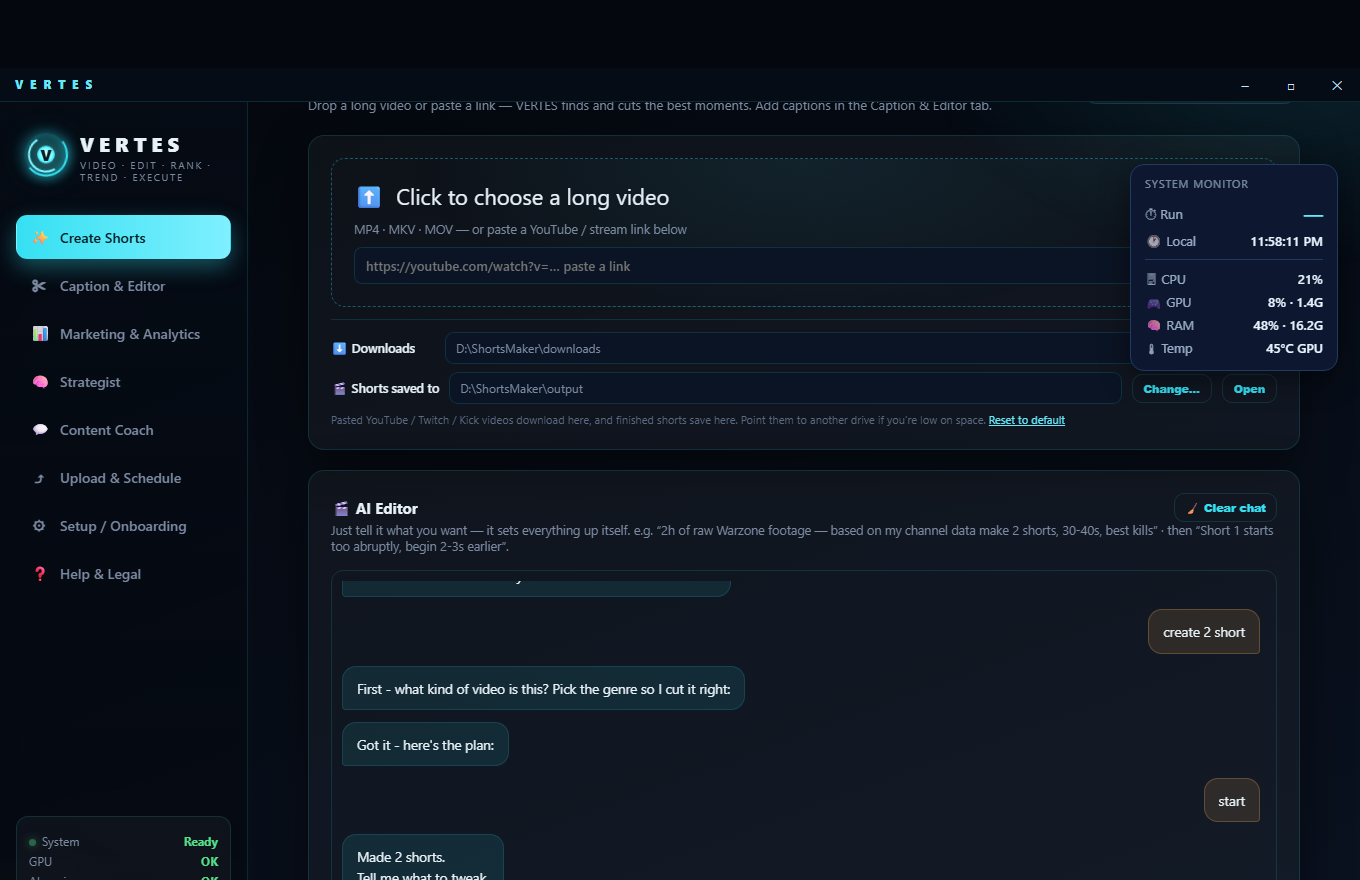
Create Shorts tab
  • 📥Pick footagechoose a video file from your PC or paste a link. Any length: even a 6-hour stream.
  • 🎮Game / genretells VERTES what to look for. If it's unsure, it asks a quick clarifying question so it hunts the right moments.
  • #️⃣How many Shorts & lengthe.g. 3 shorts, 30–40s each. No caps — make as many as you like.
  • 🙂Facecamif you stream with a camera, VERTES finds it and places it as a split or a circle at the top.
  • 🏷️Channel brandingdrop your social icons (Twitch/YouTube/TikTok/X…) plus your handle onto every clip, in the corner you choose.
  • 🎬Outro cardoptional end card with your channel name.
  • 📊System monitorlive CPU/GPU/RAM/temperature + a timer, so you can see it working.
  • ▶️StartVERTES downloads (if a link), transcribes, finds the best moments, cuts, crops vertical and ranks them. Clips land in your Shorts folder.
Good to know: Create makes clean, fast clips. Captions are added on demand in the next tab, so every caption is perfectly synced to that exact clip.
2

Caption & Editor

Fine-tune a clip and add karaoke-style captions — one clip, or many at once.

Where it lives: the Caption & Editor tab in the left menu. Pick a clip from your gallery, or tick several to caption in a batch.
  • ✂️Cut (timeline)drag the start/end handles, or type an exact time, to trim the clip before captioning.
  • 📍Caption positiontop, middle or bottom (top clears YouTube's UI).
  • 🔤Fontany font installed on your Windows.
  • 🌍Caption languagekeep the original speech, or "English (translate)" to auto-translate any spoken language into English captions.
  • 🖼️Framingkeep as-is, or a streamer facecam split (choose the cam corner, shape — bar/circle/square — and where to place it).
  • 🔡Bigger spoken wordpops the currently-spoken word larger for that trending karaoke look.
  • 🎨Caption style14 ready-made colour styles; the base colour is the word, the glow is the spoken (karaoke) word.
  • 📚Caption selectedcaption several shorts at once. Optional: delete the original after captioning (goes to Recycle Bin).
3

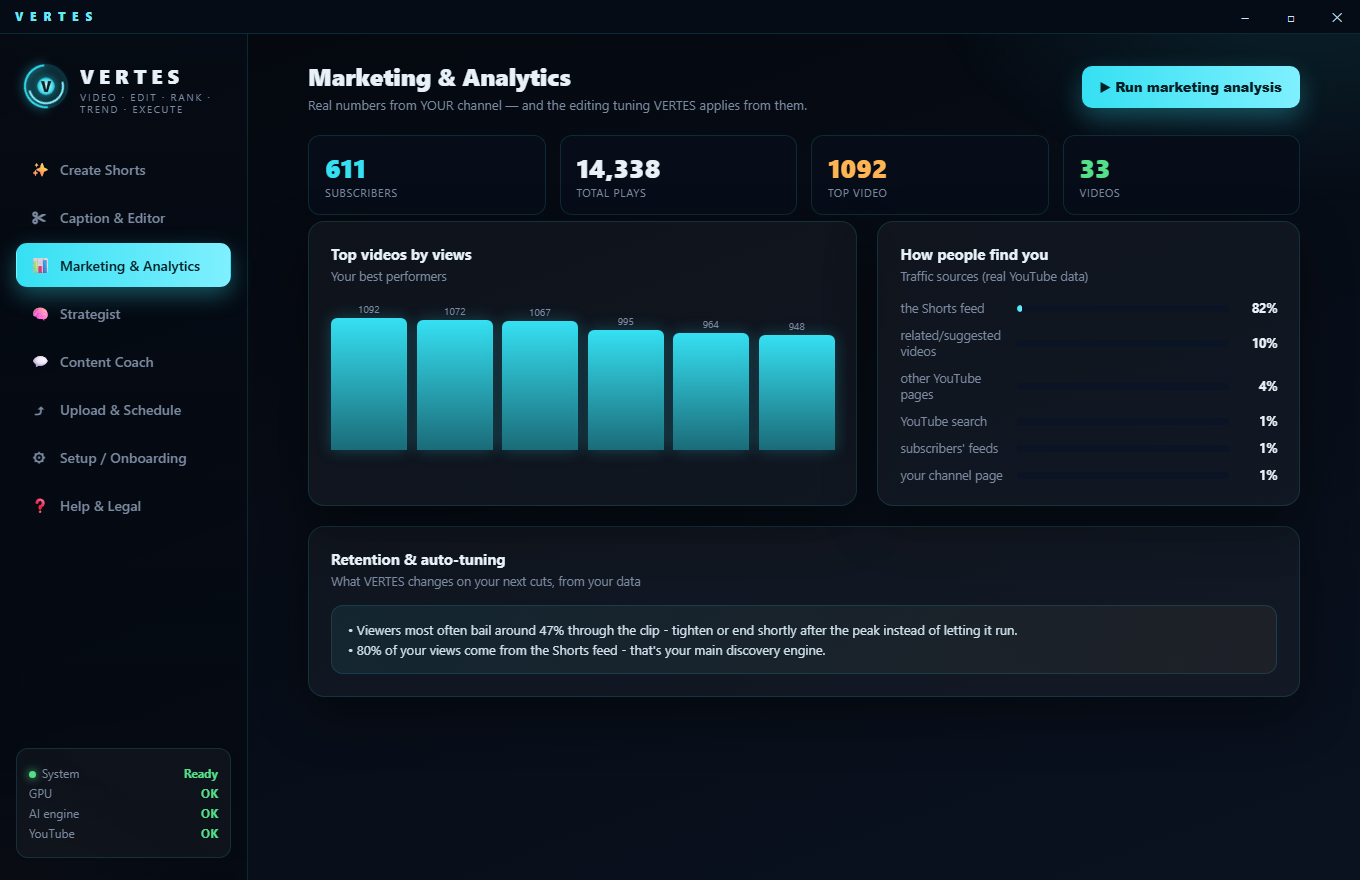
Marketing & Analytics

Real numbers from YOUR channel — and the tuning VERTES applies from them.

Marketing & Analytics tab
  • 📈Real KPIsviews, watch time, retention (average view %) and subscribers, pulled straight from YouTube Analytics.
  • 🚦Traffic sourceswhere views come from, so you know what's actually working.
  • 🧠Channel DNAVERTES learns what holds YOUR audience (openings, lengths, moment types) and feeds it back into the next cuts.
  • 🔄Run learnrefresh the learning from your latest real analytics whenever you want.
Why it matters: this is the loop nobody else has — publish → measure → the next batch is tuned automatically.
4

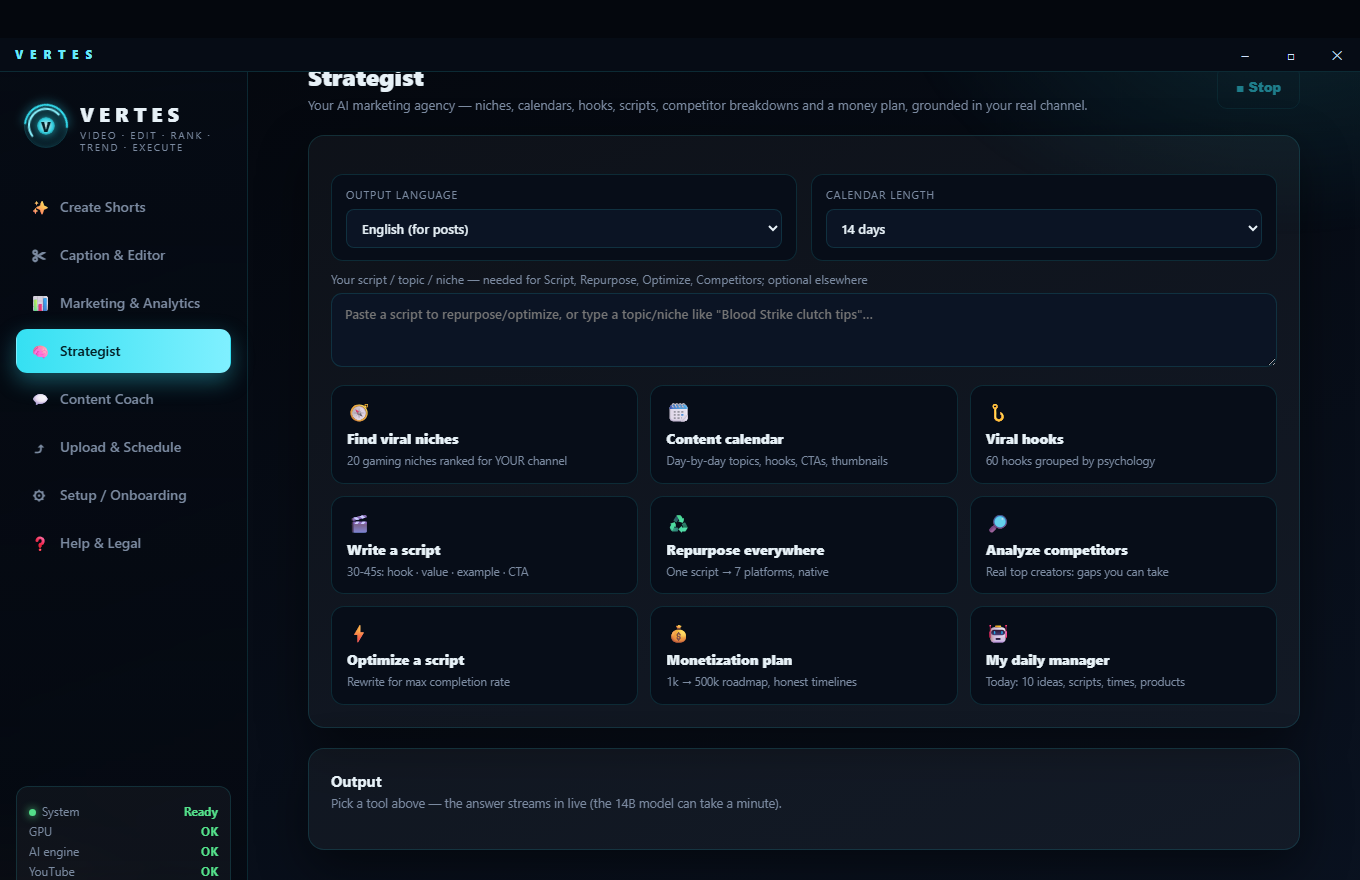
Strategist

Nine marketing tools, all anchored to YOUR games and channel.

Strategist tab
  • 🧭Find viral niches20 gaming niches ranked for your channel.
  • 🗓️Content calendarday-by-day topics, hooks, CTAs and thumbnails.
  • 🪝Viral hooks60 hooks grouped by psychology.
  • 🎬Write a scripta 30–45s structure: hook · value · example · CTA.
  • ♻️Repurpose everywhereone script → native posts for every platform.
  • 🔎Analyze competitorsreal top creators (live YouTube data) and the gaps you can take.
  • Optimize a scriptrewrite for maximum completion rate.
  • 💰Monetization plana 1k → 500k roadmap with honest timelines.
  • 🤖My daily managertoday's 10 ideas, scripts, best times and products.
5

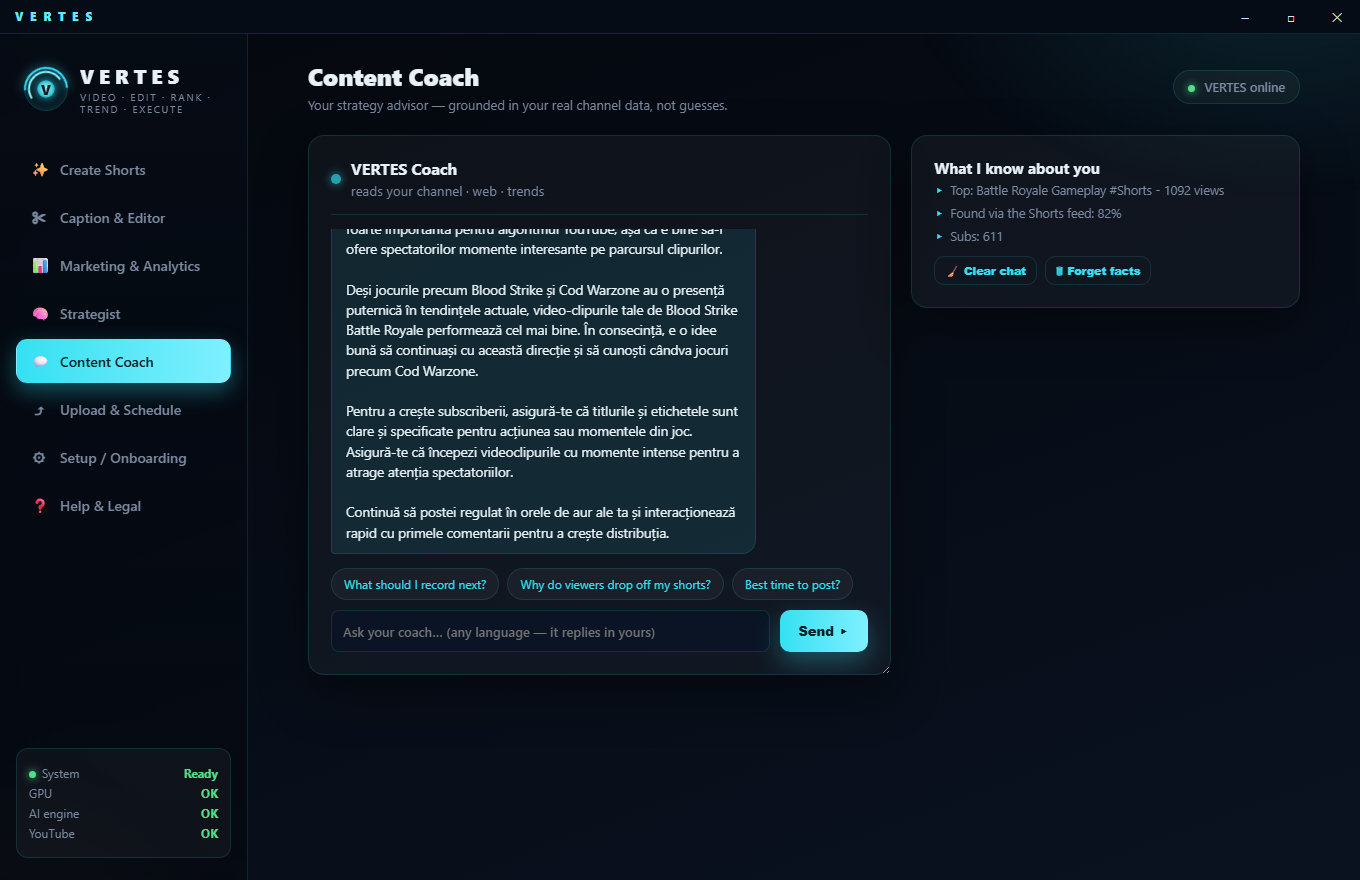
Content Coach

Ask anything — strategy advice grounded in real data, not guesses.

Content Coach tab
  • 💬Chatask about titles, ideas, what to post, why a clip flopped — in any language, it always answers in English.
  • 🌐Grounded answersthe coach uses live web research plus your real channel data, so advice is specific to you.
  • 🧩Knows your nicheit's pinned to your actual games and what already performs for you.
6

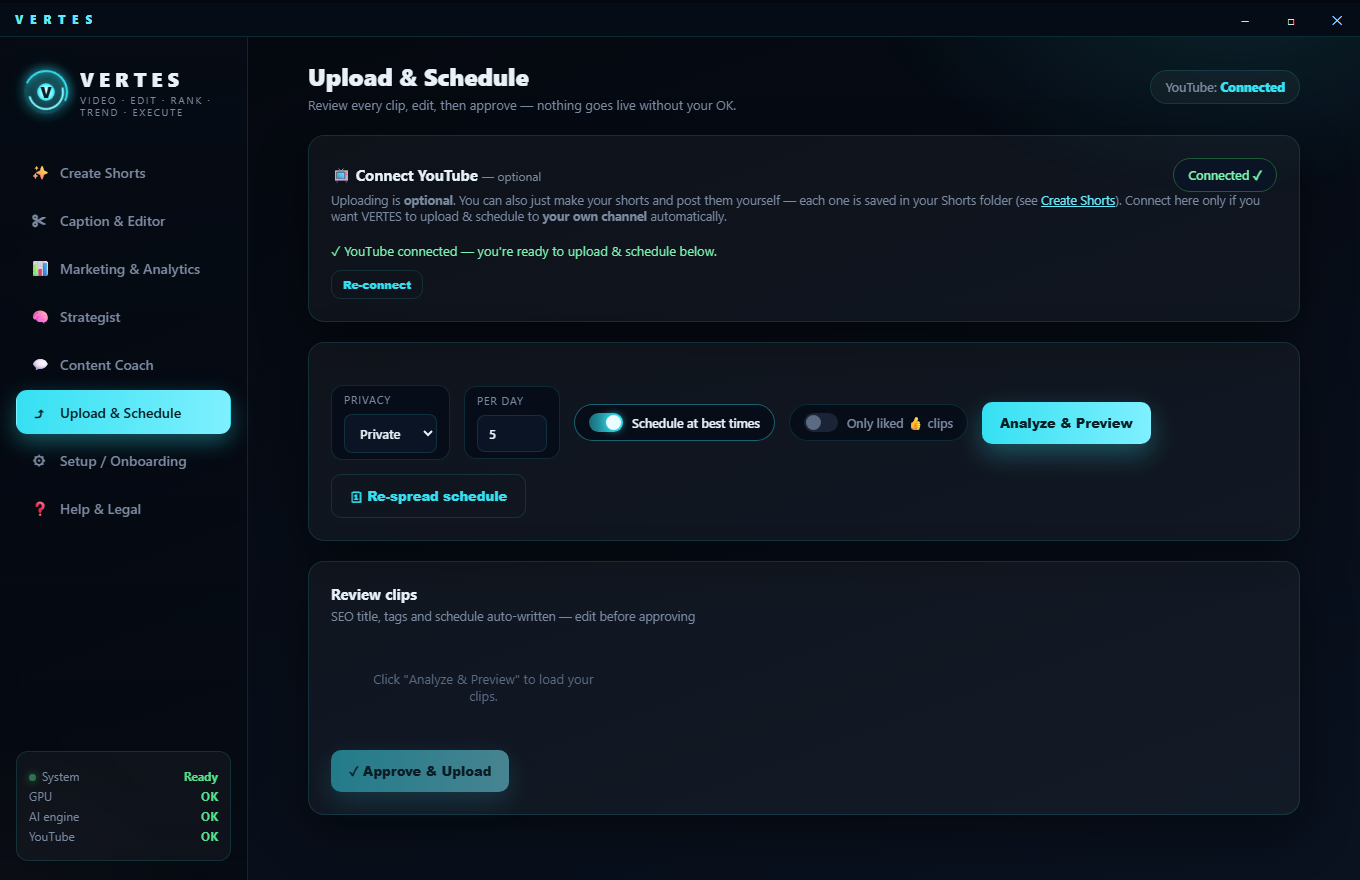
Upload & Schedule

Optional auto-upload to your own channel — SEO written, best times picked.

Upload & Schedule tab
  • 🔌Connect wizarda step-by-step guide to link your own YouTube (your own quota, no gatekeeping). Upload is optional — you can always post clips yourself.
  • ✍️SEO titles & tagswritten for each clip; you review and approve before anything goes live.
  • Best posting timesschedules your Shorts into good slots automatically.
  • 🔧Optimize published videosscans your live Shorts, flags under-performers vs your game's benchmark, and rewrites title/description/tags (grounded in real viral titles) — then updates them on YouTube with one click.
Honest note: editing a live video updates its search/suggested reach over time — it does not "re-launch" it. VERTES tells you the truth about what each fix can and can't do.
7

Setup / Onboarding

One-time setup: the AI engine, your licence, fonts.

Where it lives: the ⚙ Setup / Onboarding tab. You'll visit it once when you first install.
  • 🔑Activate this devicepaste your licence key (from your purchase email) to unlock VERTES on this PC.
  • 🧠Install the AI engineone click installs the free local AI (Ollama + models). The smart features (editor, coach, titles) use it; video cutting works even without it.
  • Or use Claudepaste your own Claude API key for the premium brain — pennies per session, billed to you, your data.
  • 📁Folders & fontschoose where clips are saved and see which fonts are available for captions.
8

Help & Legal

Get unstuck fast, and everything official.

Where it lives: the ❓ Help & Legal tab, plus quick links at the bottom of the menu.
  • FAQ + AI helpcommon answers, plus an assistant that walks you through anything step by step.
  • 🎖️Your membershipyour rank, activation status and device.
  • 📄EULA & licencesthe terms and the open-source components VERTES builds on.
  • 🔗Quick linksVisit website, join the Discord community, and leave feedback — all from the menu.

Deciding if VERTES is right for you

Three straight answers to the questions people ask before buying, including the cases where we tell you to use something else instead: